
As educators, we are always aiming to spark students’ imaginations and deepen engagement in the classroom. One of the most effective ways to achieve this is through visuals, which possess a unique ability to capture attention and spark curiosity. In my work teaching general English to university students at Hiroshima Bunkyo University, where learners are primarily between the A1 to B1 CEFR levels, I have noticed a growing need to engage students in ways that resonate with their fast-paced digital lives. This raises a critical question: Which types of visuals are most effective in engaging today’s students? The answer is complex, but it is clear that many students are now accustomed to quick, bite-sized media: the kind found on platforms like TikTok, Instagram Reels, and YouTube Shorts. In this article, we will look at the transformative potential of one such format known as the cinemagraph, and how this captivating visual tool offers educators a powerful way to enhance both teaching materials and student engagement.
What is a Cinemagraph?
Cinemagraphs are “a magical hybrid of photography and video. They contain subtle motion that plays in a short, never-ending loop, while the rest of the image remains still” (King, n.d., para. 1). This creative blend of photography and videography is arguably more mesmerizing and engaging than a static photograph or traditional video. See Figure 1 for an example.
Figure 1
Cinemagraph Example
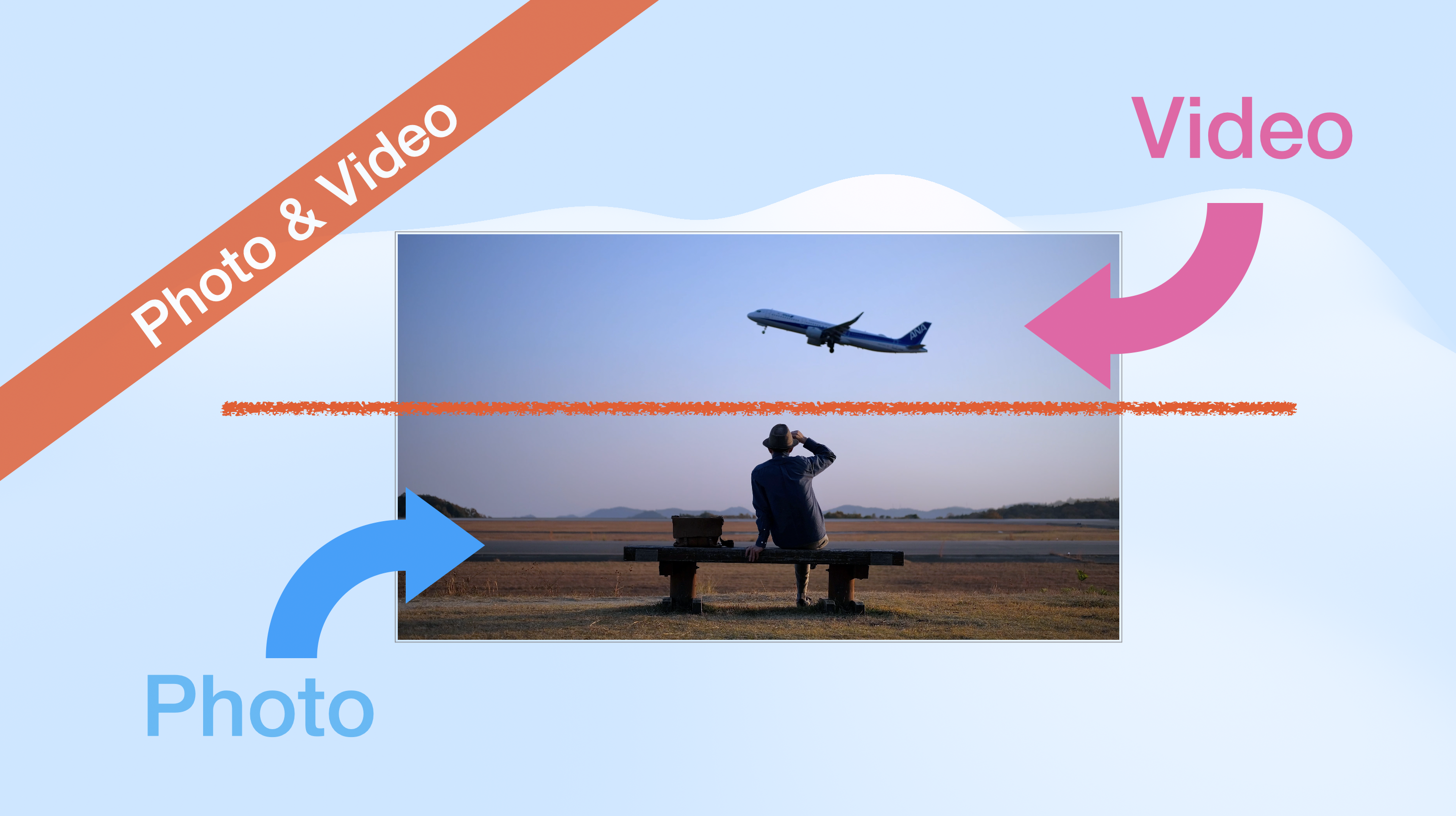
Cinemagraphs are created using a short video clip that was recorded on a tripod or stable surface. A still frame from the video is selected and then added as a layer on top of the video. Next, a small portion of the still frame is removed using a masking tool to reveal the motion beneath. Finally, a loop is applied, producing a 10–20 second video that will auto play in an infinite seamless loop. This may sound complex, but there are plenty of smartphone applications, such as Flixel Cinemagraph Pro and Cinemask Pro, which simplify the process—though it is worth noting that these are paid apps. Thanks to many of today’s phones being able to capture a video in 4K, their quality is nothing short of outstanding. Once published on the web, cinemagraphs are displayed in HD or 4K quality and presented to viewers in the form of a short seamless loop. Scan the QR code below (Figure 2) to view them in motion and to see several other examples of cinemagraphs.
Figure 2
Cinemagraph in Motion

Why Use Cinemagraphs in Education?
Memory is closely tied to emotion; research has shown that emotional experiences enhance memory retention. LaBar and Cabeza (2006) suggest that emotions play a key role in enhancing memory, with emotionally-charged experiences being more easily remembered than neutral ones due to their impact on memory processing. Therefore, being able to evoke certain feelings in a learner during a lesson might help with knowledge retention. Cinemagraphs excel in this regard, as they not only engage students but also possess a mesmerizing quality reminiscent of the enchanting paintings in Harry Potter.
Cinemagraphs are a form of visual storytelling that draws the viewer deeper into an idea than a static photo, while still leaving room for interpretation and creativity. In contrast, a video presents everything to the viewer without leaving much room for interpretation. In my teaching, I’ve utilized cinemagraphs to introduce new topics and enhance class discussions. Even the most apathetic students light up with curiosity as these living photos load on their devices. It is for this reason that I would like to share with you a few different ways you can incorporate this captivating form of art into your lessons.
Incorporating Cinemagraphs Into Learning
There are several ways cinemagraphs can be used both inside and outside of the classroom. A cinemagraph can be embedded into a digital book, blog, or website. For example, I created a website for my general English students where they can access materials for all 12 units of our in-house curriculum designed for first and second-year students. Each unit begins with a discussion activity and features a cinemagraph complementing the unit’s theme, as can be seen in Figure 3 below. This helps activate students’ background knowledge, encourage initial discussion, and engage them with the topic before we move into the main lesson.
It is worth noting that educators do not necessarily need to create their own cinemagraphs. A convenient alternative is to explore www.flixel.com, where you will discover an extensive collection of cinemagraphs along with their embed code. These are snippets of HTML code that allow you to easily add media to websites, such as videos or images. These cinemagraphs are conveniently categorized, making it easy to find suitable content. However, there is undeniable value in creating your own cinemagraphs, as it grants you the ability to fully cater the content to your students. Moreover, the ability to create your own cinemagraphs opens opportunities for offline usage, such as incorporating them into PowerPoint presentations, or other offline materials. For example, I often begin my classes by displaying a cinemagraph, which I have made on a PowerPoint slide, followed by a discussion question that encourages students to engage with the visual. This method helps to immediately capture their attention and introduce the lesson’s theme. If you do decide to create your own cinemagraphs, the best cinemagraph creation tool is arguably Cinemagraph Pro by Flixel because it offers advanced features and high-quality video output, making it ideal for creating professional grade cinemagraphs.
Teachers can also encourage students to create their own cinemagraphs. In this case, it is best for students to use simple free tools. Currently, two noteworthy cinemagraph applications include Draw Motion with Stabilization by Sergey Pekar (2020) and Fotodanz by bbigg Applications (2018). For example, as part of a culminating activity within a shopping-themed unit, I had my students create cinemagraphs to promote a product. Each group presented their product advertisement to the class. This was then followed by a fun voting process, where students chose the best, most creative, and amusing ads, thereby infusing an element of friendly competition into the learning experience. It also proved to be a fantastic opportunity for students to showcase their creativity.
Figure 3
Student Website Example

Conclusion
I believe cinemagraphs are a compelling force in education, breathing life into learning materials and engaging students on a creative level. They offer a unique way to capture students’ interest, while also serving as a powerful visual component that can enhance the quality of any digital curriculum. In today’s technological world, digital forms of art are becoming increasingly accessible and easier to use, opening new, exciting doors for educators and curriculum designers.
References
Bbigg Applications. (2018). Fotodanz (Version 1.9.708) [Mobile app]. Uptodown. https://fotodanz.en.uptodown.com/android
LaBar, K. S., & Cabeza, R. (2006). Cognitive neuroscience of emotional memory. Nature Reviews Neuroscience, 7(1), 54–64. https://doi.org/10.1038/nrn1825
King, C. (n.d.). What is a cinemagraph and how do they work? Flixel. https://blog.flixel.com/what-is-a-cinemagraph-how-do-they-work
Pekar, S. (2020). Draw motion with stabilization (Version 3.59) [Mobile app]. App Store Preview. https://apps.apple.com/us/app/draw-motion-with-stabilization/id118866661...