In today’s digital age, A.I.-generated images are presenting a unique challenge to many industries and sectors. For example, many in the television and movie industry are becoming increasingly worried about the looming threat of A.I. on their livelihoods and intellectual property, as a recent controversy over Studio Ghibli-style A.I. image rendering went viral (Urbain, 2025). Furthermore, incorporating A.I. language learning tools, such as large language models like ChatGPT, and A.I. material creators, like Canva and Midjourney, have had a mixed reception from learners (Ahmed et al., 2025).
However, utilizing image rendering A.I.s is a great way to supplement materials, engage learners, promote inclusivity and representation, save teachers’ time, and foster meaningful class discussion and debate. This article will outline some of the A.I. image generators available and go on to highlight and give examples of the benefits of using them. Finally, this article will mention some of the limitations for teachers of using A.I. picture generators.
What’s Out There
There are an ever-increasing number of A.I. image-creating platforms out there to choose from. From subscription-based models like Adobe CC and Midjourney, which is hosted on Discord, to free sites, such as ChatGPT and Perchance.org. Each platform is slightly different with some limiting the number of images you can create per day, for example ChatGPT and Midjourney, while others are limitless, like Perchance.org. For that reason, I will briefly describe the image-creating process on Perchance.org.
Figure 1
QR Code Link to Perchance.org A.I. Image Generator
Perchance.org
Scan the QR code (Figure 1) which will take you to Perchance.org. Once on the webpage, you will see a description box to enter an image prompt, an anti-description box for things you don’t want to appear in your image, a drop-down box of a wide range of art styles to choose from: from professional photo, to oil painting, to claymation, the option for landscape, square, or portrait images, and the number of images you’d like the A.I. to generate (the maximum being 30 at a time on the desktop). After your images have been generated you have the option to ‘heart’ particular images to save them or regenerate a particular image by pressing the circular arrows. See Figure 2 for an example image.
Figure 2
Example of a Perchance.org Generated Image
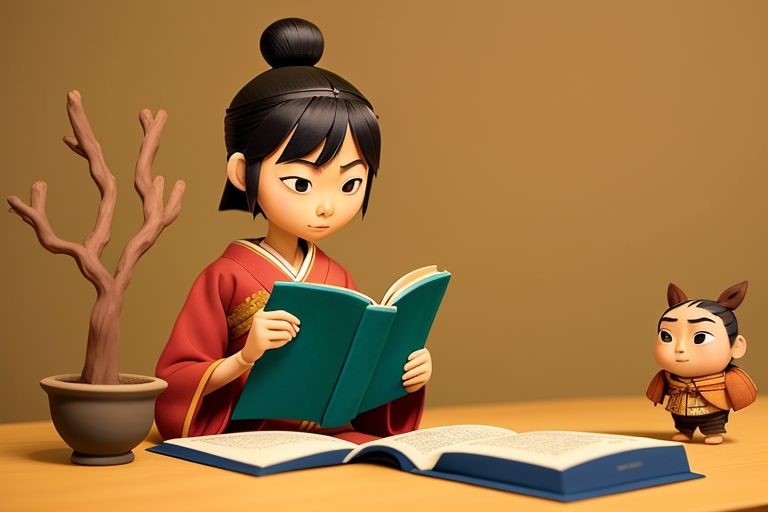
Note. The following are the prompts used to generate the image: Japanese university student, reading at home, evening time, wearing traditional clothes; Art Style: Claymation; Shape: Landscape.
Most A.I. generators have a similar system, but others are less user-friendly. For instance, on Midjourney the user just enters a prompt. Rather than having drop-down boxes, the user must add in different parameters for the A.I. to follow. For instance, one needs to add the --ar parameter followed by the desired aspect ratio that is desired (e.g., --ar 16:9) for the generated images to be a certain size and shape.
The Benefits of Incorporating A.I. Generated Images in One’s Classes
I have been using A.I. rendered images in many ways for the past few years. Here are some of the benefits and ways in which I have utilized A.I. created imagery:
A.I. generated pictures can be used as supplementary visual aids for listening and reading activities. High-quality, visually appealing images can help activate schemata, add extra context to the activity, and be more engaging for the students than stock photos from suppliers such as Getty Images.
Worries over copyright and Creative Commons licenses do not apply to most A.I. rendering sites and platforms. This means that the images can be used for in-class materials and for commercial use. However, while some image-generation platforms, like OpenAI’s DALL-E, allow users to use the generated pictures freely, others may impose restrictions. So, always check the terms of service.
Mass-produced textbooks from large international publishers such as Cambridge and Oxford University Press focus on diverse representation in their publications to ensure inclusivity in their imagery and artwork. While this ought to be lauded, in a monolingual context like Japan, this can lead to students becoming less engaged with the material as they don’t see themselves represented as much (Entwistle, n.d.). Using A.I. image generators can be used to create material that motivates students to see their imagined future identities (Kanno & Norton, 2003). I used A.I. pictures in a lesson to have students think about their future after graduating by using real stories of ex-students from our department (see Figure 3).
In my experience, Google searching for specific images to help supplement one’s lesson can be time consuming and often ends in a dead end. Admittedly, there is a knack to A.I. prompt writing that takes a little time getting used to, but once you get over that wrinkle, generating your own image is often much quicker than lengthy Google searches.
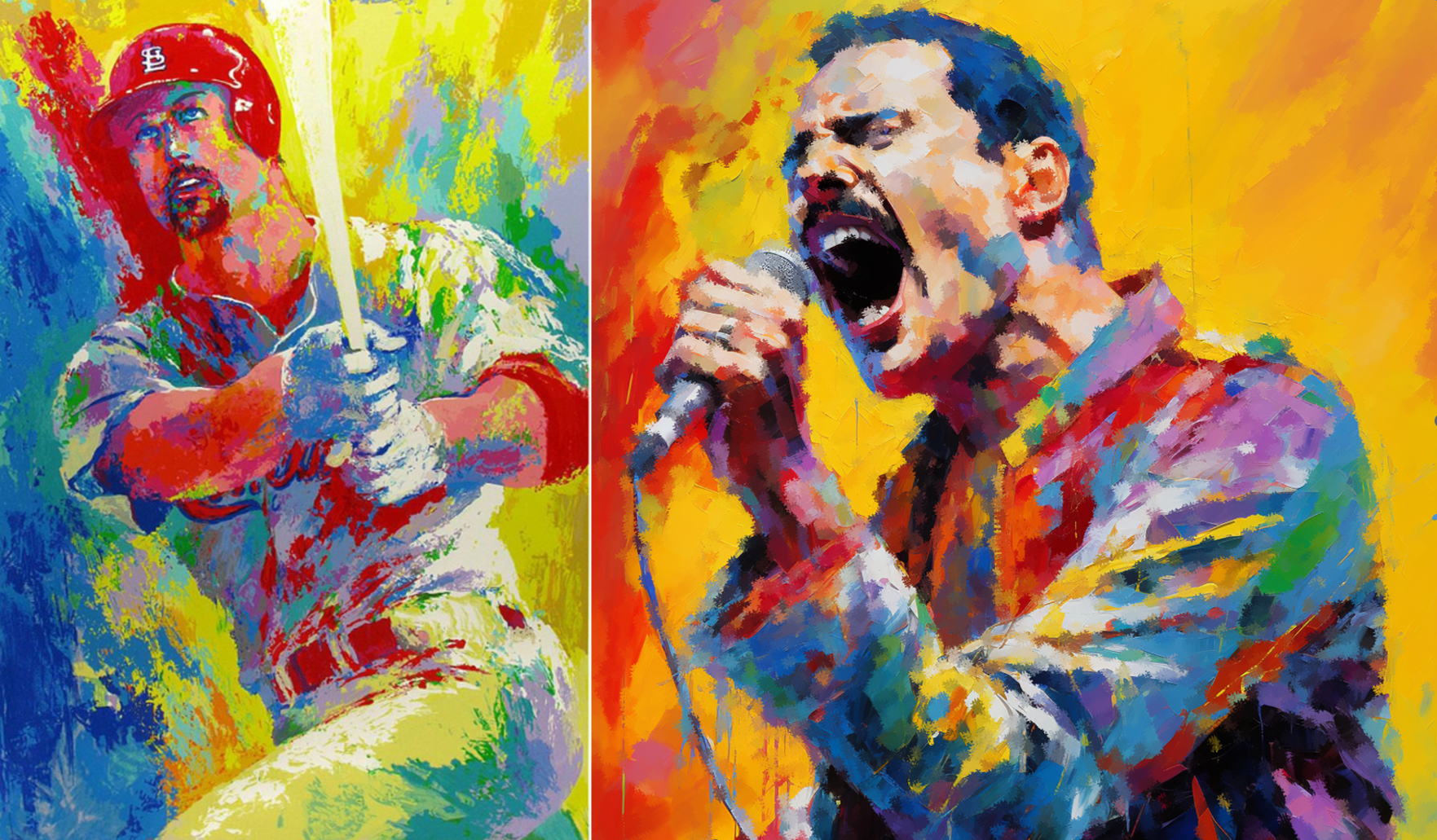
With higher-level learners, I had students compare a real piece of art by 80s artist Leroy Neiman, and a piece generated by A.I. (see Figure 4). This was used as the base of a wider discussion about A.I., the arts, and the future.
Figure 3
Midjourney Generated Image of an Ex-Student Who Went on to Become a Flight Attendant

Figure 4
A.I. Art Versus Real Art: Which One is Which?
The list above is not exhaustive as there are many other possibilities for the use of A.I.-produced images in English language education.
The Limitations of Using A.I. Image Generators
Of course, using A.I. image generators is not without its limitations. Currently, many generators have problems rendering certain anatomical features like hands and fingers, especially with free generators like Perchance.org. Often there will be either too many or too few fingers, or the fingers will be merged into the object the person is holding. However, often this is not an issue if you are willing to overlook minor inconsistencies. See Figure 5 for an example of an image with problematic digits on hands.
Also, if your image prompt is overly complex, it can be a little time-consuming before you get an image you find satisfactory. Like any new technology, prompt writing is a learning curve, and I have found it gets easier relatively quickly.
Figure 5
Example of an Inaccurate Hand Rendering from Midjourney
Conclusion
Even though there is a great deal of suspicion based around A.I. and its place in the classroom (Sumakul et al., 2022), A.I. is not going to be going anywhere anytime soon so we should be looking for ways to leverage its usefulness. Incorporating A.I. rendered images into class materials can help supplement lessons, motivate students through increased representation, save teachers’ time, and spark meaningful discussion.
References
Ahmed, I., Ghafoor, A., Liliuara, D., & Qurrota’ Akyuningrum, V. (2025). The impact of AI learning tools on ESL learners’ motivation and success: A systematic literature review. English Learning Innovation, 6(1), 134–142. https://doi.org/10.22219/englie.v6i1.38961
Entwistle, T. (n.d.). Issues and ideas for a monolingual context. Internation House World Organisation. https://ihworld.com/ih-journal/issues/issue-48/issues-and-ideas-for-a-mo...
Kanno, Y., & Norton, B. (2003). Imagined communities and educational possibilities: Introduction. Journal of Language, Identity, and Education, 2(4), 241–249. https://doi.org/10.1207/S15327701JLIE0204_1
Sumakul, D. T. Y. G., Hamied, F. A., & Sukyadi, D. (2022). Artificial intelligence in EFL classrooms: Friend or foe? LEARN Journal: Language Education and Acquisition Research Network, 15(1), 232–256. https://so04.tci-thaijo.org/index.php/LEARN/article/view/256723
Urbain, T. (2025, March 28). Copyright questions loom as ChatGPT’s Ghibli-style images go viral. The Japan Times. https://www.japantimes.co.jp/business/2025/03/28/companies/chat-gpt-ghib...